

How to Map an HR Recruiting Workflow Before You Add AI
Before choosing any AI tool, draw the whole hiring journey on one page. Here is the step-by-step map we use in HR workshops — and where AI actually helps.

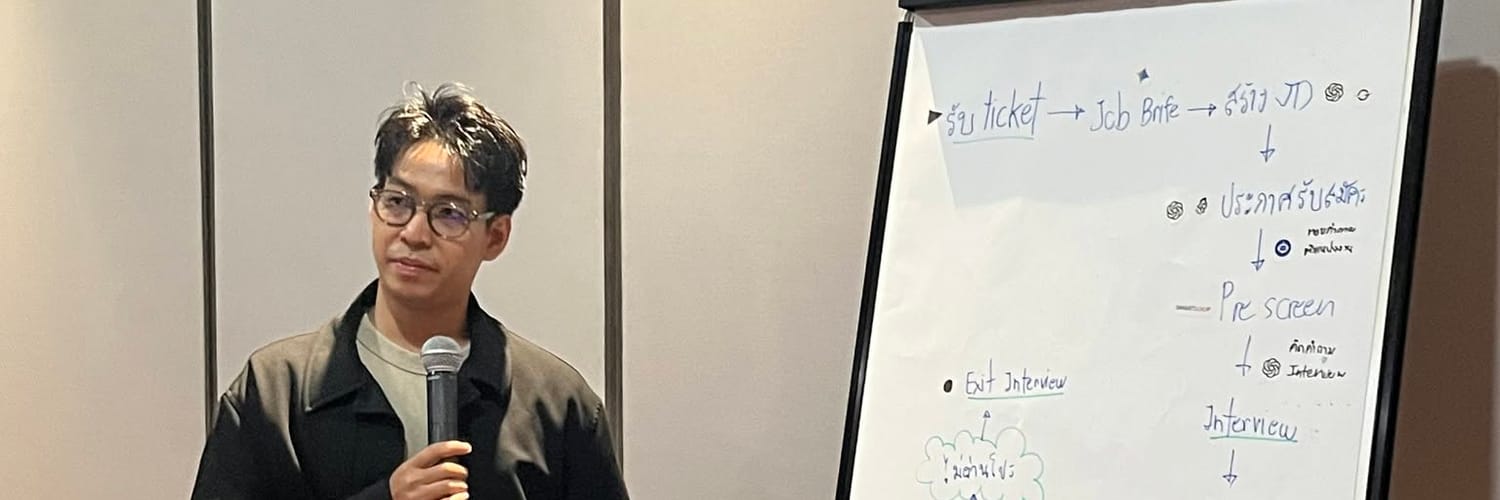
Short answer: map every step of hiring — from the first request to the exit interview — on one page, then mark which steps are repetitive writing or communication. Those are where AI helps first. Decisions about people stay with people.
In our HR workshops, we don't open with a tool demo. We open with a flip chart and one question: what actually happens from the moment a manager asks for a new hire?
Step 1: Draw the whole journey, not just recruiting
Most teams think "AI for HR" means screening CVs. When we draw the full flow on the board, it usually looks like this:
- Request ticket — a manager asks for a new role
- Job brief — HR clarifies what the role needs
- Job description (JD) — written and approved
- Job posting — published on job boards and channels
- Pre-screening — filtering applicants
- Interview questions — prepared per role
- Interview
- Interview result — communicated to every candidate
- Job offer
- Contract
- Onboarding
- Training
- Probation
- Exit interview — when someone leaves
Seeing all fourteen steps together changes the conversation. Recruiting is only the front half.
Step 2: Mark what kind of work each step is
Next to each step, we ask the team to label the work:
| Type of work | Example steps | Can AI help? |
|---|---|---|
| Writing from a template | JD, job posting, offer letter | Yes — a chat assistant drafts, HR edits |
| Preparing questions | Interview questions per role | Yes — drafted from the JD |
| Producing training content | Onboarding and training material | Yes — voice and video tools |
| Judging people | Pre-screen decisions, interview, probation | Support only — humans decide |
On our board, the AI tools ended up beside JD writing, job posting, interview questions and onboarding — including AI voice and video tools to turn a written onboarding guide into short videos.
Step 3: Keep the human checkpoints visible
The steps that involve judgment — who gets interviewed, who gets the offer, who passes probation — stay human. We draw them in a different colour so nobody forgets. AI can summarise, draft and remind; it should not decide.
Step 4: Start with one step and measure it
Don't automate all fourteen at once. Pick the step that hurts most — usually JD writing or onboarding content — run it with AI for a month, and compare the time spent before and after.
FAQ
Which HR tasks should we use AI for first?
Start with repetitive writing: job descriptions, job postings, interview questions and onboarding material. They are frequent, template-based and easy to check.
Should AI screen candidates automatically?
No. AI can summarise CVs against the job brief, but shortlisting and hiring decisions should stay with people to keep the process fair and accountable.
Do we need a big HR system to start?
No. A chat assistant and a shared document are enough for the first pilot. Map the workflow first; choose systems later.